GPU as a Service

Dedicated NVIDIA GPUs via VMs or Kubernetes

Access high-performance NVIDIA GPUs via GPU Passthrough on your VMs, or via the NVIDIA GPU Operator on your Kubernetes clusters. Two modes, one hardware catalog.

4 GPUS

L40S - A100 - H100 - RTX PRO

2 modes

VM Passthrough - Kubernetes

96 GB

VRAM max (RTX PRO 6000)

3700 TOPS

Performance RTX PRO 6000 (FP4)
GPU CATALOGUE

Four NVIDIA families for each workload

L40S for inference and development, A100 for ML training, H100 for LLM and exascale computing. Start with the L40S and work your way up.

L40S

NVIDIA Ada Lovelace
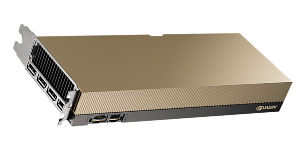
image 7
Memory 48 GB GDDR6
ECC Included
Performance INT8 733 TOPS
Performance FP32 91.6 TFLOPs

A100

NVIDIA Ampere
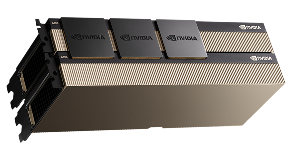
image 6
Memory 80 GB HBM2e
ECC Included
Performance INT8 624 TOPS
Performance FP32 19.5 TFLOPs

H100

NVIDIA Hopper
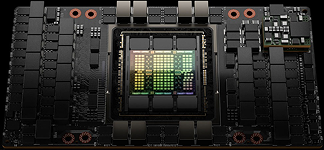
H100NVIDIA Hopper
Memory 80 GB HBM2e
ECC Included
Performance INT8 3026 TOPS
Performance Tensor TF32 756 TFLOPs

RTX PRO 6000

NVIDIA Blackwell
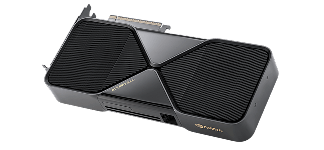
NVIDIA Blackwell
Memory 96 GB GDDR7
ECC Included
Performance FP4 3.7 PFLOPS
Performance FP32 117 TFLOPs

Start-up advice

Start with an L40S for development and prototyping. Upgrade to an A100 for standard ML model training, and reserve the H100 for demanding workloads such as LLM training or high-performance computing.
Access modes

GPU on VM or GPU on Kubernetes

Hikube offers two ways of accessing the same hardware. Choose according to your workload and orchestration level.

GPU on Virtual Machine PCI Passthrough

The physical GPU is attached directly to the VM via VFIO-PCI. Full and exclusive access to the gas pedal - native performance, no orchestration overhead.

  • Applications requiring full GPU control
  • Non-containerized legacy or specialized workloads
  • Isolated development environments
  • Graphics applications (rendering, CAD)
  • CUDA prototyping and experimentation

Learn more about VMs

GPUs on Kubernetes GPU Operator

GPUs are exposed to pods via the NVIDIA Device Plugin, managed by the GPU Operator. Scheduling orchestrated by Kubernetes - pod sharing, autoscaling, ML pipelines.

  • Containerized AI/ML workloads
  • Automatic scaling of GPU applications
  • GPU resource sharing between pods
  • Parallel and distributed jobs
  • Complex ML/AI pipelines

Learn more about Kubernetes

GPU on VM
GPU on Kubernetes
Access mode
Exclusive PCI Passthrough
Shared Device Plugin
Insulation
1 GPU = 1 VM (dedicated)
Scheduling orchestrated by K8s
Performance
Native (passthrough)
Native (device plugin)
NVIDIA drivers
Manuals via cloud-init
Automatic (GPU Operator)
Scaling
Vertical only
Horizontal + Vertical
Sharing between workloads
No
Yes (between pods)
Setup time
~5 minutes
~10 minutes
Complexity
Simple
Moderate
Getting started

Ready in a few lines of YAML

Whether on a VM or a Kubernetes cluster, GPU configuration boils down to declaring the type of GPU you want in your manifest. The rest - drivers, scheduling and allocation - is handled by Hikube.

On a VM

Add a gpus[] field to your VMInstance. The GPU is attached in PCI Passthrough, guaranteeing direct and exclusive access to the hardware. Multi-GPU possible by repeating the inputs.

yaml
kind: VMInstance
spec:
instanceType: u1.2xlarge
gpus:
- name: "nvidia.com/AD102GL_L40S"


See the complete guide

On Kubernetes

Add a GPU node group to your cluster, then request the GPU in your pods via resources.limits. The GPU Operator manages the drivers automatically.

yaml
kind: Kubernetes
spec:
nodeGroups:
-gpu-workers:
instanceType: u1.xlarge
gpus:
- name: "nvidia.com/AD102GL_L40S"

See the complete guide
DImensioning

Recommended CPU/RAM ratio per GPU

Plan on 8 to 16 vCPUs per GPU. Universal (u1) instances are recommended for GPU workloads.

INSTANCES
VCPU
RAM
RECOMMENDED USE
u1.xlarge
4
16 GB
1× L40S - development, prototyping
u1.2xwide
8
32 GB
1× A100 - fine-tuning, multi-model inference
u1.4xwide
16
64 GB
1-2× A100 - intensive ML training
u1.8xwide
32
128 GB
4× H100 - distributed drive, LLM
Post-deployment verification

Confirm GPU access

On a VM

bash
# SSH connection
virtctl ssh -i ~/.ssh/id_ed25519 ubuntu@gpu-workstation

# Check GPU
nvidia-smi

#
Detailed info nvidia-smi \
--query-gpu=name,memory.total,utilization.gpu \
--format=csv

On Kubernetes

yaml
# GPUs exposed per node
kubectl get nodes -o custom-columns=\
NAME:.metadata.name,\
GPU:.status.allocatable. 'nvidia\.com/gpu'

# From a pod
kubectl exec -it <pod-name> -- nvidia-smi

# Allocated resources
kubectl describe node <gpu-node> \
| grep -A5 "Allocated resources"

Why the GPU cloud

The GPU, the gas pedal of modern workloads

The CPU is designed to execute complex sequential tasks. The GPU, on the other hand, is architected for massive parallelism: thousands of single cores working simultaneously on the same problem. It's this fundamental difference that makes the GPU indispensable for training machine learning models, large-scale inference, 3D rendering or scientific computing.

Buying GPU hardware in-house implies long investment cycles, capacity management that's difficult to anticipate, and rapid obsolescence: an H100 bought today will be obsolete in 3 years' time. The GPU as a Service model provides access to the latest generation of NVIDIA hardware on demand, scaling according to actual load, and paying only for what is consumed.

At Hikube, GPUs are hosted in Switzerland and accessible via standard APIs, without lock-in or proprietary agents. Whether your workload is running on an isolated VM or in a Kubernetes cluster shared between teams, access to the hardware remains identical.

svgviewer-output

CPU vs GPU: the right tool for every task

The CPU excels at low-latency sequential processing. The GPU is optimized for massive matrix operations: tensor multiplication, convolutions, attention mechanisms, which are at the heart of deep learning.

svgviewer-output

Guaranteed data sovereignty

Your models, datasets and checkpoints remain in Switzerland. Native RGPD compliance, with no additional configuration.

svgviewer-output

Capex-free access to the latest generation

L40S, A100, H100 available on request. No purchase cycle, no amortization, no server room management. You get access to the latest hardware when you need it.

svgviewer-output

Integration into your existing stack

Standard Kubernetes, native YAML, compatible with your existing MLOps tools (Kubeflow, Argo Workflows, MLflow). No pipeline rewriting.

FAQ

Questions about GPU as a Service

Questions teams ask before deploying their first GPU workloads.

Which GPU should I choose for my workload?

The rule of thumb: start with the L40S for all inference, development and prototyping. It covers the vast majority of cases at lower cost. Switch to theA100 when you're training models seriously (fine-tuning, large datasets). Reserve the H100 for really demanding workloads: Multi-billion parameter LLM, distributed training on multiple nodes.

VM or Kubernetes, what's the best choice?

If your application isn't containerized, you need full access to the GPU, or you're prototyping: take a Virtual Machine. It's simpler, faster to set up, and the GPU is entirely dedicated to you.

If you're already orchestrating your workloads with Kubernetes, need automatic scaling or share GPU resources between several teams: opt for the Kubernetes mode. The additional complexity is offset by the flexibility.

Can I share a GPU between several jobs?

Plan on 8 to 16 vCPUs per GPU. A u1.2xlarge (8 vCPU, 32 GB RAM) is a good starting point for a single GPU. For 4 H100 GPUs, go up to u1.8xlarge (32 vCPU, 128 GB RAM). Undersizing the CPU creates data pre-processing bottlenecks that cap GPU utilization.

Should you manage NVIDIA drivers yourself?

On VM, yes. You install the drivers via a cloud-init script on first boot. The doc provides the full script, so it's a one-time operation.

On Kubernetes, no. The GPU Operator takes care of this automatically on GPU nodes. You activate the addon in the cluster manifest, and the rest is transparent.

Can I share a GPU between several jobs?

In VM mode, no. The GPU is entirely dedicated to the VM. In Kubernetes mode, the GPU Operator lets you allocate whole GPUs to different pods on the same node, but a pod can't request a fraction of a GPU. If you need to run several small jobs in parallel, the Kubernetes approach with multiple pods on a multi-GPU node is the most efficient.