
Managed Kubernetes
Dedicated managed Kubernetes in Switzerland, workers in your tenant.
Hikube Managed Kubernetes is managed Kubernetes with hosting and data in Switzerland: Certified Kubernetes Hosted (CNCF) clusters on Talos Linux, operated by Hidora SA (KCSP) on three Swiss datacenters (Geneva, Gland, Lucerne). The control plane is dedicated to your cluster, its own API server and its own etcd, shared with nobody, and workers stay in your tenant. CNI is Cilium. PVCs replicate, sync or async. No replication outside Switzerland.
- Data sovereignty
- Talos Linux
- CNCF certified
- ISO 27001
- 3 DC
- SLA 99.99%
This is Swiss Kubernetes hosting for enterprise workloads, with hosting and data in Switzerland: control plane operated by Hidora SA, workers in your tenant, PVCs on Geneva, Gland and Lucerne. You keep kubectl, Helm, Flux or Argo. Add-ons include ingress, cert-manager, monitoring and the GPU operator. CNI is Cilium. Talos nodes. Hidora is a KCSP; Hikube is Certified Kubernetes Hosted. Support FR/EN. GPUs included, subject to availability in the 14-day trial.
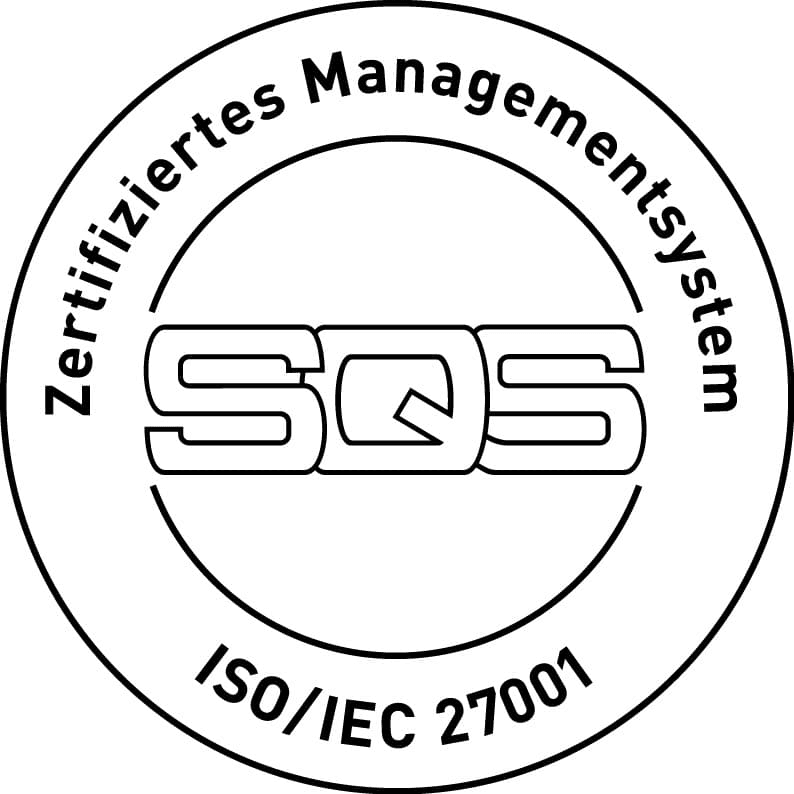


Capabilities
Data sovereignty
Exclusive Switzerland, operator Hidora SA, three Swiss DCs.
Talos Linux
Immutable OS built for Kubernetes. Smaller surface, nodes that do not drift.
CNCF certified
CNCF-conformant Kubernetes. Hidora is a KCSP, Hikube is Certified Kubernetes Hosted. CNI is Cilium. kubectl and Helm unchanged.
Worker autoscaling
Node groups, optional GPUs (included in the 14-day trial), scale with load.
Multi-DC PVCs
Persistent volumes that can replicate across Geneva, Gland and Lucerne.
Private registry
Images in Hikube Registry as a Service, same jurisdiction as the cluster.
Observability in the tenant
Grafana, VictoriaMetrics, VictoriaLogs, in your tenant.
A modest production cluster, at catalogue price: CHF 638/month
| Line | Quantity | Unit price | Per month |
|---|---|---|---|
| Managed control plane | 1 | CHF 32 | CHF 32 |
| Workers u1.xlarge (4 vCPU, 16 GB) | 3 | CHF 160 | CHF 480 |
| Block Storage, 3x replicated (PVCs) | 500 GB | CHF 0.18/GB | CHF 90 |
| Ingress | 1 | CHF 32 | CHF 32 |
| Public IPv4 | 1 | CHF 4 | CHF 4 |
| Outbound traffic | any volume | not billed | CHF 0 |
| Total | CHF 638 |
Assumptions: 3 u1.xlarge workers, 500 GB of persistent volumes replicated across three sites, one ingress, one public IPv4, any amount of outbound traffic. On-demand catalogue price, no term commitment, excluding VAT; a one- to three-year commitment is negotiable. Not included: your application licences, backup of your volume and database contents, and GPU node groups, which bill separately. Replace the quantities with your own on the pricing page.
Who answers for what
Hidora SA operates
- The control plane: API server, etcd, scheduler, controller manager, across three Swiss sites, with etcd backup and restore.
- Kubernetes version upgrades, proposed and run with you, never imposed on a Friday.
- The worker system: Talos, the runtime, the Cilium CNI, the CSI. You do not SSH into a node, there is no SSH.
- Infrastructure availability under the published SLA, and 24×7 platform monitoring.
You keep
- Your manifests, your images and their provenance, your Helm charts, your GitOps.
- Node group sizing and your pods’ requests and limits: an undersized cluster is not a platform incident.
- In-cluster RBAC, your NetworkPolicies, your admission controllers.
- Application backup: we back up etcd, not the contents of your PVCs or your databases. This is the point buyers discover latest.
- Your workloads’ compatibility with the target Kubernetes version before each upgrade.
This split describes the service; the signed contract prevails if the two differ.
In detail
Talos Linux exists only to run Kubernetes. Ubuntu or Rocky with kubelet still has SSH, a package manager and a general-purpose OS to patch: nodes drift, the attack surface grows. Talos is immutable. No SSH or admin shell on the node. Config goes through an API. Less drift, fewer general-Linux exploits, image upgrades instead of apt. kubectl and Helm do not change: the cluster stays standard Kubernetes, CNCF certified.
Data sovereignty for a managed Kubernetes platform means you can name the legal operator, the country of the control plane, and the country of etcd, PVCs, images and backups. On Hikube the operator is Hidora SA. The country is Switzerland. The sites are Geneva, Gland and Lucerne. European data residency follows from exclusive Swiss hosting: nothing replicates to the EU or the United States. That is a different claim from a hyperscaler Europe region, where the parent company remains American and the CLOUD Act still applies. Platform teams comparing managed Kubernetes cloud platforms for sovereignty should ask three questions: who is the legal entity, where does cluster state live, and do registry and Vault stay in the same jurisdiction. Hikube answers Hidora SA, three Swiss datacenters, Registry as a Service and Vault as a Service in the tenant. kubectl, Helm and GitOps do not change. Engineer support is in French and English, from Geneva. GPU node groups are included in the 14-day trial, subject to availability.
Yes. Flux/Argo manage workloads inside the cluster. The Hikube API creates the cluster, node groups, registry and VPC.
Related products
 GPU cloudSix dedicated NVIDIA cards, 24 to 141 GB.
- Registry as a ServiceSwiss private registry, satellite of managed Kubernetes. Auth in the project.
- VPC & subnetsVMware VLANs to VPC and subnets, three Swiss DCs, no SDN fabric to repurchase.
- Vault as a ServiceSecrets and keys in Switzerland, for apps, CI and Kubernetes.
Frequently asked questions
Yes. Hikube is Swiss cloud IaaS (VMs, managed Kubernetes, GPU, S3, backup, vault) operated by Hidora SA on three datacenters: Geneva, Gland, Lucerne. Published SLA 99.99%, ISO 27001, engineer support in French and English. It is not shared web hosting. GPUs are in the 14-day trial, subject to availability. Windows Server is a licensed image on instances.
No. Hikube is a sovereign cloud: compute, storage, backups and metadata stay on three independent Swiss datacenters (Geneva, Gland, Lucerne). There is no replication to the EU or the United States.
Through the Hikube API and the console. Terraform and Cluster API integration in preparation. kubectl, Helm and S3 clients stay. Docs: docs.hikube.cloud.
In Switzerland. etcd and the control plane are operated by Hidora SA. PVCs can replicate across Geneva, Gland and Lucerne, synchronously or asynchronously. Images pull from Hikube Registry as a Service, same jurisdiction. Nothing replicates to the EU or the United States.
No. A Zurich, Switzerland North or europe-west region does not change the group’s legal nationality. The US CLOUD Act can still apply. Hikube has no US parent: the operator is Hidora SA, Swiss law, three DCs in-country.
Talos is an immutable OS built for Kubernetes: no SSH or admin shell on the node, no packages that drift. Smaller attack surface, identical nodes, config via API. The cluster stays standard Kubernetes, CNCF certified.
Yes, two distinct programmes. Hidora SA is a Kubernetes Certified Service Provider (KCSP) on the CNCF landscape. Hikube Managed Kubernetes is Certified Kubernetes Hosted, also listed on the landscape. Clusters run on Talos. This is not CNCF AI Conformance.
Engineer support is in French and English, from Geneva. German is not a support language, even though the site is translated.
Ready to run on 100% Swiss infrastructure?
14-day trial, no credit card. GPUs included, subject to availability.